
- Home
- About us
- Products
- for Siemens
- Agricultural Terminal
- for A-B-B
- Advantech
- Allen Bradley
- AMTouch
- B&R Power Panel
- BECKHOFF HMI operator Repair
- Beijer HMI
- Bosch Rexroth
- Danielson Touch Screen Replacement
- Delem
- Delta
- DMC
- EATON Micro Panel
- ELO Touch Screen Panel
- ESA HMI
- Exor UniOP
- EZ Automation
- Fagor
- Fuji Hakko
- GE Fanuc
- GUNZE Touch Panel
- IDEC
- Koyo
- KUKA SmartPAD
- Lenze
- Microtouch 3M Versatouch touch screen
- Mitsubishi
- Omron
- Panasonic
- Parker
- Proface
- Red Lion
- Robotic Controller
- Schneider
- Sigmatek HMI
- Ventilator Parts
- Weinview
- Other Terminal Brand
- HMI Touch Screen Panel
- Touch Panel Screen Suppliers
- Touch Screen Panel supplier
- Auxiliary Accessories
- LCD Display
- test11
- Faqs
- News
- Certificate
- Contact us
Siemens OP7 Troubleshooting and Common Issues
Siemens OP7 Troubleshooting and Common Issues
Comprehensive guide to diagnosing and fixing common problems with the Siemens SIMATIC OP7 operator panel
Table of Contents
- Understanding the Siemens OP7 Operator Panel
- Common Siemens OP7 Issues and Step-by-Step Troubleshooting
- 1. RAM Failure or Startup / Boot Problems
- 2. Repeated Resetting / Cycling After Long Power-Off
- 3. Blank LCD Screen (Backlight On Only)
- 4. Battery Errors & Faults After Long Shutdown
- 5. Communication Failure with PLC
- 6. Blank Screen + Completely Unresponsive Keys
- 7. Initialization / Transfer Errors (e.g. "$044 Trans Error")
- 8. Startup Hangs with "Flash Full" Message
- 9. Restarts After Program Download (Especially S7-200)
- 10. Persistent Blank Screen & No Response to Any Input
- Why Thousands of Engineers Choose VICPAS for Siemens OP7 Repairs
- References
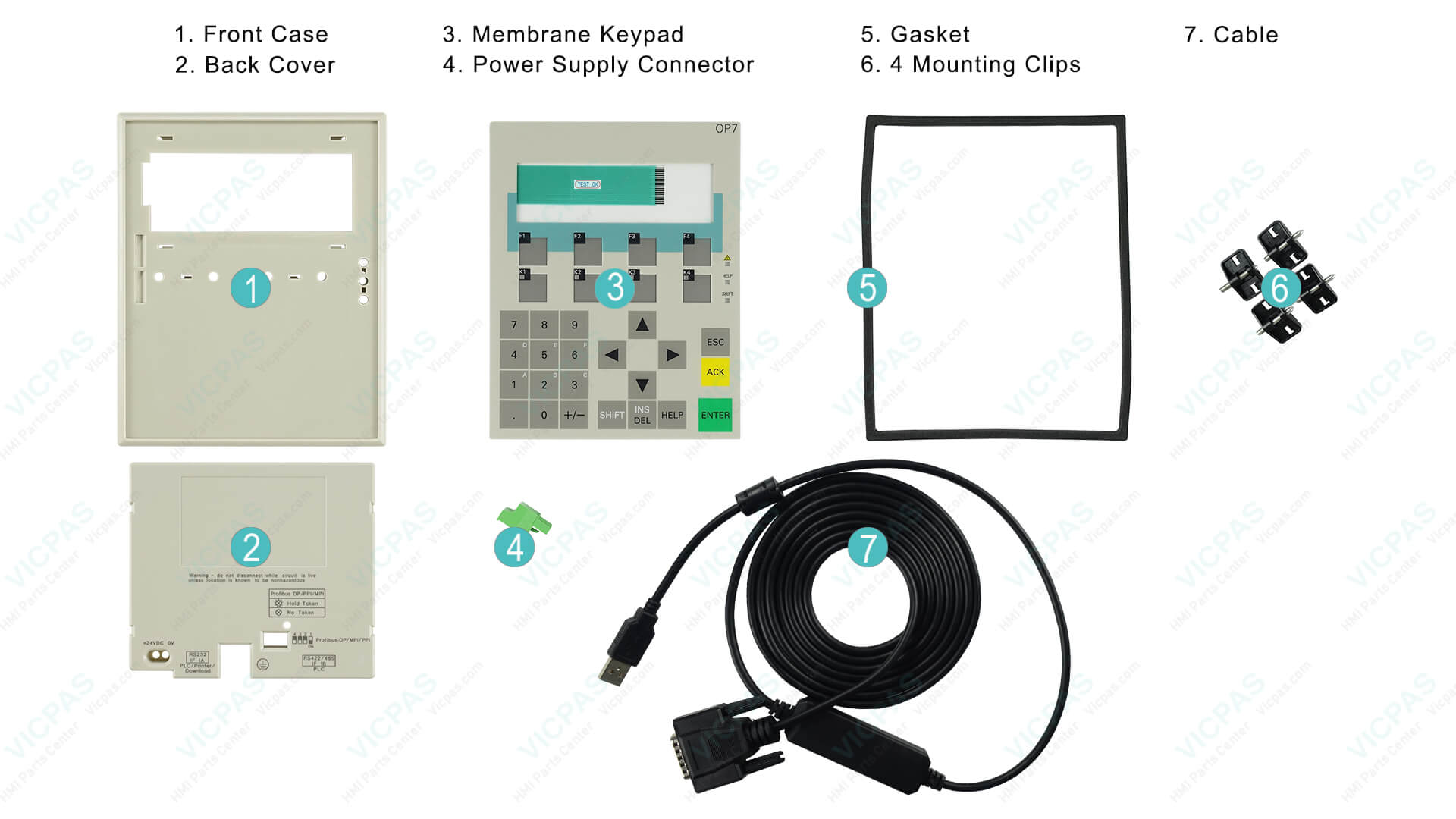
As a leading provider of HMI replacement parts, VICPAS Touch Technology Co., Ltd. has extensive experience in supporting industrial automation systems, including the Siemens OP7 operator panel. With over 80,000 items in our inventory and a focus on high-quality, fully tested replacements like membrane keypads and plastic cases for Siemens OP7 models (such as 6AV3607-1JC20-0AX1, 6AV3607-1JC00-0AX0), we help businesses minimize downtime and extend the life of legacy equipment.
Our products come with a 365-day warranty, global express shipping via DHL/UPS/FedEx, no minimum order quantity, and flexible payment options including PayPal. In this detailed guide, we cover the most frequently reported Siemens OP7 issues and practical troubleshooting steps — drawn from real user experiences on Siemens forums, PLCtalk, Control.com, and our own extensive repair history.
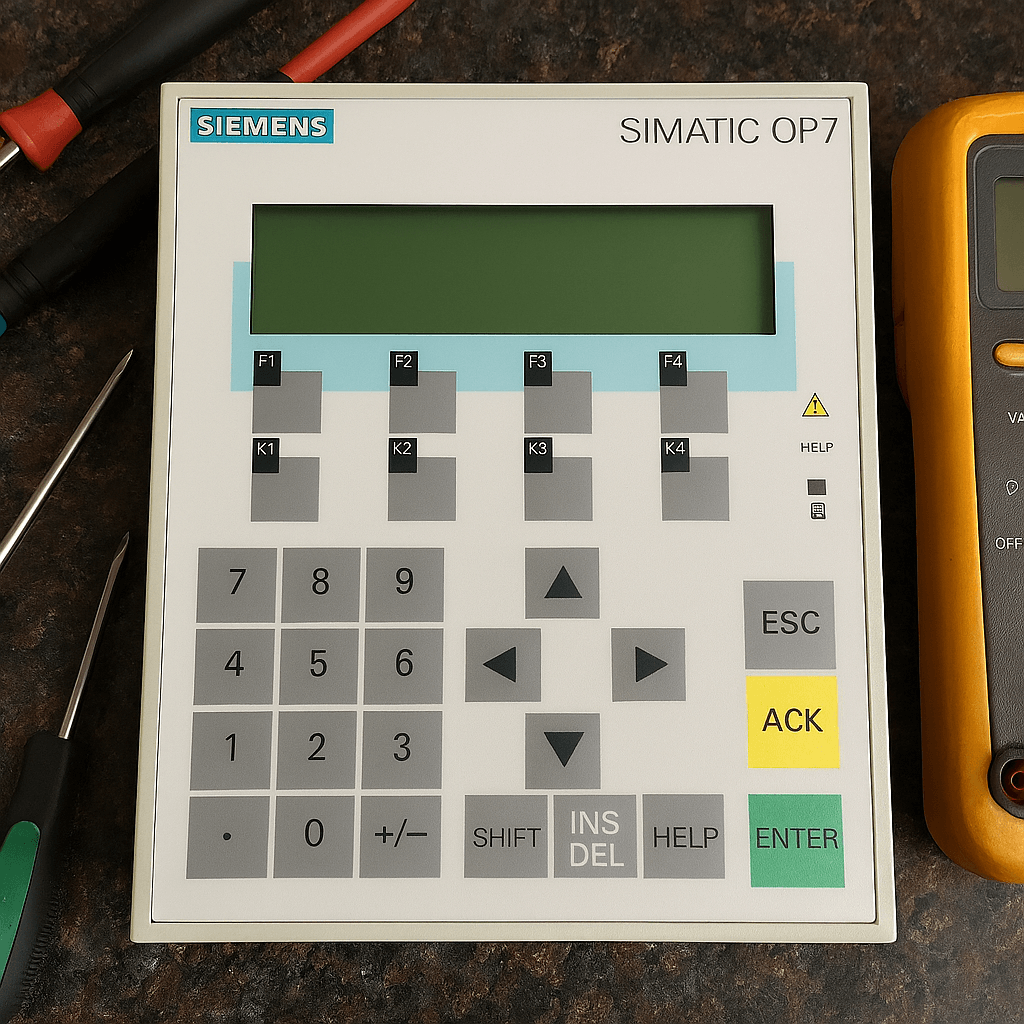
Understanding the Siemens OP7 Operator Panel
The Siemens SIMATIC OP7 is a classic text-based HMI (Human-Machine Interface) widely used in automation systems with S7-200, S7-300, and other PLCs. It features a monochrome display, membrane keypad, and reliable MPI/PROFIBUS communication. While durable, age-related issues such as capacitor degradation, battery failure, backlight problems, and memory corruption are very common after 15–25 years of service.
At VICPAS, we specialize in keeping these legacy panels operational through high-quality replacement parts — avoiding expensive full system upgrades. Our replacement keypads, front panels, plastic cases, and compatible cables are rigorously tested for perfect fit and long-term reliability.
Common Siemens OP7 Issues and Step-by-Step Troubleshooting
Important: Always disconnect power and follow lockout/tagout procedures before working on any industrial equipment.
1. RAM Failure or Startup / Boot Problems
- Typical Symptoms: Freezes during boot, error messages, no display progress
- Common Causes: Corrupted RAM / flash memory, power surge damage, aging components
- Troubleshooting Steps:
- Power cycle the unit several times
- Enter download/transfer mode (usually hold specific function keys during power-on — refer to manual)
- Use ProTool/ProTool/Pro CS to re-download the complete configuration/project
- Check/replace battery if unit has been powered off for extended periods
- VICPAS Recommendation: If hardware memory is failing, replace with our tested Siemens OP7 keypad + shell kits (compatible with 6AV3607-1JC00-0AX0 / 6AV3607-1JC20-0AX1). Available now at our store.
2. Repeated Resetting / Cycling After Long Power-Off
- Typical Symptoms: Panel reboots every few seconds or minutes
- Common Causes: Dead internal battery, lost configuration, capacitor issues
- Troubleshooting Steps: Check PLC battery status → Perform factory reset → Re-upload project → Stabilize 24V DC supply
- VICPAS Recommendation: Replace membrane keypad early — prevents further internal stress. Same-day global shipping available.
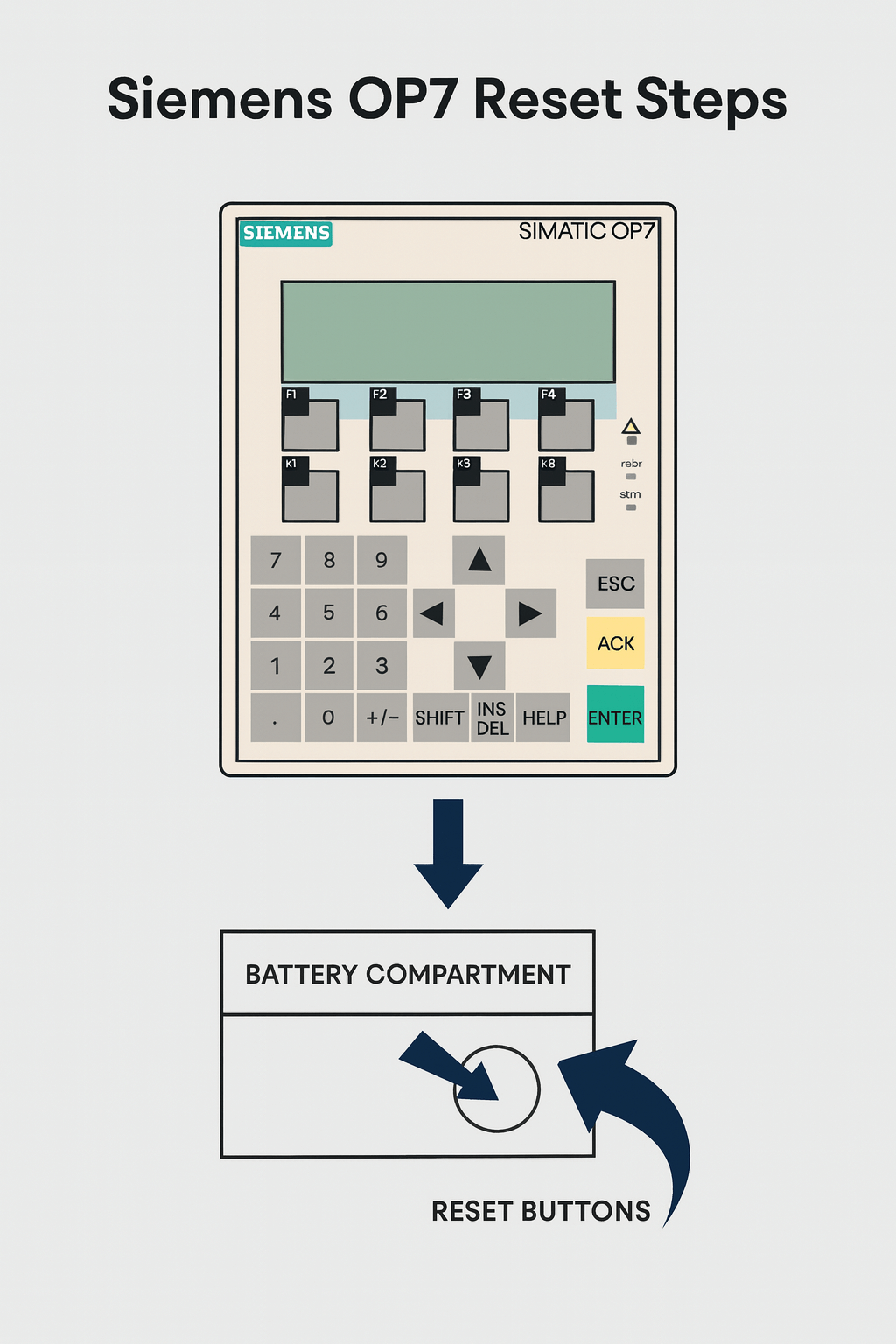
3. Blank LCD Screen (Backlight On Only)
- Typical Symptoms: Display completely dark except faint backlight glow
- Common Causes: Loose ribbon cable, failed LCD, backlight inverter failure, power board issue
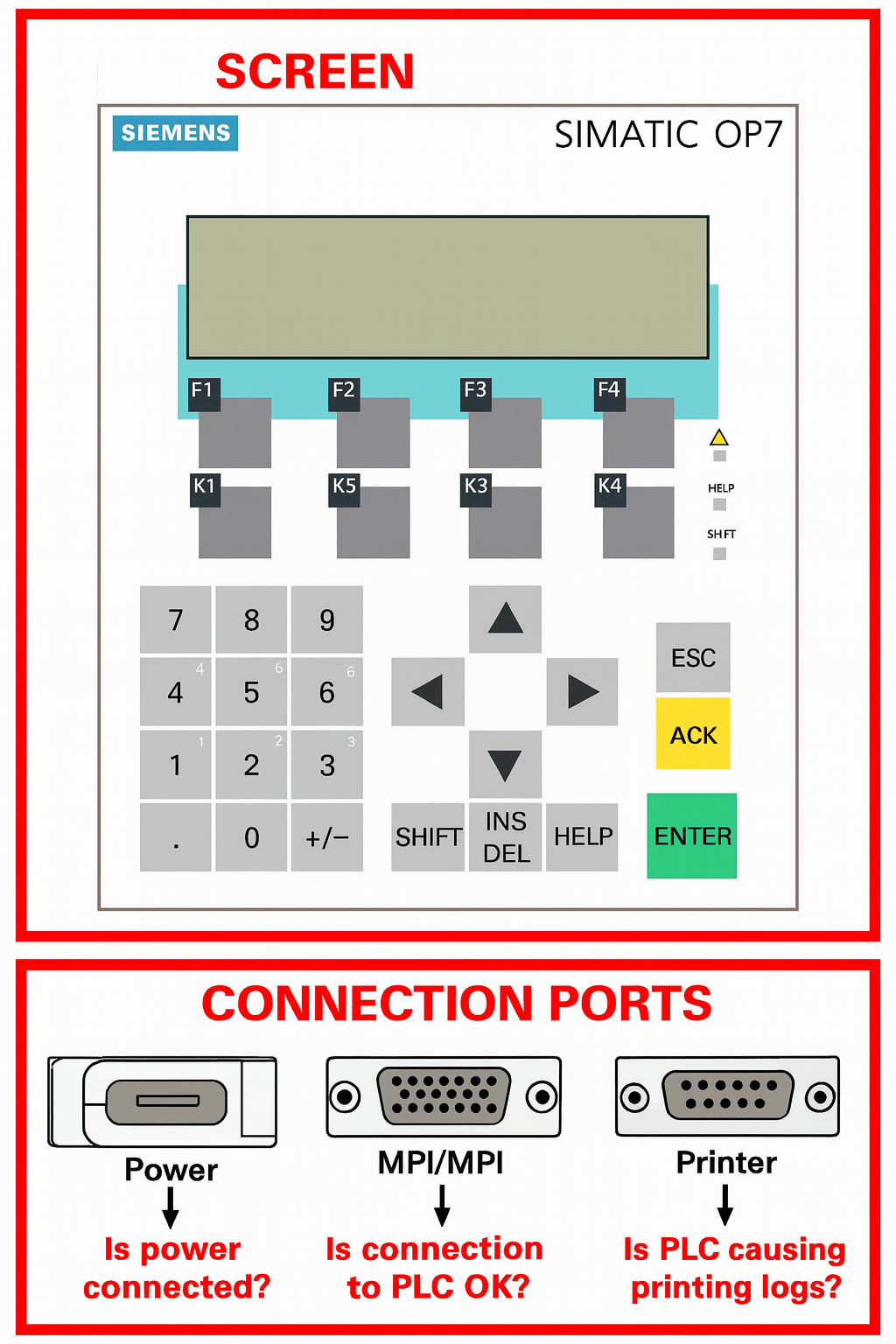
- Troubleshooting Steps: Verify 24V DC input → Check all internal connections → Test backlight separately → Consider professional repair or replacement
- VICPAS Recommendation: Our complete front overlay + keypad + case assemblies (e.g. 6AV3607-1JC20-0AX0 style) resolve most display-related failures — 180-day warranty.
4. Battery Errors & Faults After Long Shutdown
- Typical Symptoms: Battery fault message on startup, often shown on connected S7-300 CPU or during OP7 initialization
- Common Causes: Depleted or failed internal battery (especially after years without power), configuration loss
- Troubleshooting Steps:
- Replace the battery in the connected PLC (e.g., S7-300 CPU battery)
- Perform memory checks and full reset through the OP7 menu if accessible
- Re-upload or re-download the project file using ProTool
- Verify power supply voltage stability (24V DC)
- VICPAS Recommendation: Extend panel life with our compatible replacement parts — keypad and case kits prevent recurring battery-related stress on the system.
5. Communication Failure with PLC (No Parameter Changes / Connection Lost)
- Typical Symptoms: Panel initializes continuously, parameters revert to zero, intermittent connection (works briefly after restart then fails), cannot change/view setpoints
- Common Causes: Faulty MPI/PROFIBUS cable, wrong communication settings, port damage, hardware aging in OP7
- Troubleshooting Steps:
- Inspect and replace communication cables (Ethernet/MPI as applicable)
- Power cycle both OP7 and PLC for 5–10 minutes, reconnect cables, restart
- Check baud rate, station address, and protocol settings in ProTool
- Reload software configuration and test transfer mode
- If older than 5–10 years, consider hardware degradation
- VICPAS Recommendation: Use our high-quality USB-OP-DP9 or MPI-compatible programming cables for reliable communication. Many users resolve persistent issues by replacing the entire OP7 unit — we offer tested replacements.
6. Blank Screen + Completely Unresponsive Keys
- Typical Symptoms: No display content, backlight may be off or on, no response to any key presses, cannot enter transfer mode
- Common Causes: Power supply failure, mainboard fault, keypad membrane degradation, internal connection issues
- Troubleshooting Steps:
- Measure input voltage at terminals (must be stable 24V DC)
- Check power supply unit and cables for damage
- Attempt forced transfer mode entry (hold keys per manual)
- Inspect internal ribbon cables if comfortable with disassembly (professional service recommended)
- VICPAS Recommendation: Replace faulty keypad membrane and front panel with our durable Siemens OP7 kits — cost-effective fix for unresponsive hardware. 180-day warranty included.
7. Initialization / Transfer Errors (e.g. "$044 Trans Error")
- Typical Symptoms: Specific error code like "$044 trans error" during power-up or transfer attempt
- Common Causes: Communication setup mismatch, cable problems, incorrect protocol or address
- Troubleshooting Steps:
- Review and correct MPI/PROFIBUS settings (baud rate, station number)
- Replace or test communication cable
- Clear memory and reconfigure via ProTool
- Check for firmware compatibility with connected PLC
- VICPAS Recommendation: Our replacement parts and cables ensure stable communication after repair — many users report success after hardware refresh.
8. Startup Hangs with "Flash Full" Message
- Typical Symptoms: Panel hangs during boot and displays "Flash full"
- Common Causes: Overfilled flash memory from accumulated configurations, or no valid image configured in project
- Troubleshooting Steps:
- Connect to ProTool/Pro CS software
- Clear existing projects from flash memory
- Configure at least one basic image/screen (even with dummy text) in the project
- Re-download the cleaned/updated configuration to the OP7
- VICPAS Recommendation: Prevent recurrence with optimized replacement components — our tested keypads and cases support clean reconfigurations.
9. Restarts After Program Download (Especially S7-200)
- Typical Symptoms: OP7 restarts repeatedly after downloading new program, especially when connected to S7-200 PLC
- Common Causes: Transfer mode incompatibility, firmware mismatch, protocol error during download
- Troubleshooting Steps:
- Switch to correct transfer/download mode before programming
- Verify PLC firmware version compatibility with OP7
- Use correct protocol settings in ProTool (PPI/MPI for S7-200)
- Test with minimal configuration first
- VICPAS Recommendation: Use our reliable cables for stable downloads — reduces risk of mode-related restarts.
10. Persistent Blank Screen & No Response to Any Input
- Typical Symptoms: Screen stays blank (no backlight or partial), keys unresponsive even after multiple power cycles
- Common Causes: Voltage out of spec, backlight circuit failure, main logic board fault, severe internal damage
- Troubleshooting Steps:
- Use multimeter to measure exact input voltage (should be 24V DC ±10%)
- Check power supply stability under load
- Attempt entry to setup/transfer mode with key combinations
- If no response, professional diagnostics or full unit replacement needed
- VICPAS Recommendation: Our full range of Siemens OP7 replacement parts (keypad, case, overlay) addresses most root causes — ideal for restoring full functionality quickly.
Why Thousands of Engineers Choose VICPAS for Siemens OP7 Repairs
- Over 80,000 industrial HMI parts in stock
- Every item 100% tested before shipment
- 180-day quality warranty on most products
- Urgent global express shipping (DHL / UPS / FedEx)
- No minimum order quantity — buy 1 piece
- PayPal, credit card, bank transfer accepted
- Expert technical support for legacy Siemens equipment
Ready to solve your Siemens OP7 problem today?
Browse our full range
Contact our support team
References
- Siemens Industry Support Forum – OP7 RAM failure discussion
- Siemens Industry Support Forum – OP7 reset issues
- Control.com Forum – Siemens OP7 blank LCD problem
- Siemens Support Forum – OP7 faults after long power-off
- PLCTalk Forum – Siemens OP7 communication failure
- Siemens Support Forum – Simatic OP7 blank screen
- Siemens Support Forum – OP7 initialization errors
- Siemens Official Support – OP7/OP17 "Flash full" startup hang
- Siemens Support Forum – OP7 restarting after download
- Siemens Support Forum – OP7 blank screen issues
Trust VICPAS — Keeping legacy Siemens HMIs running worldwide since 2009.