
- Home
- About us
- Products
- for Siemens
- Agricultural Terminal
- for A-B-B
- Advantech
- Allen Bradley
- AMTouch
- B&R Power Panel
- BECKHOFF HMI operator Repair
- Beijer HMI
- Bosch Rexroth
- Danielson Touch Screen Replacement
- Delem
- Delta
- DMC
- EATON Micro Panel
- ELO Touch Screen Panel
- ESA HMI
- Exor UniOP
- EZ Automation
- Fagor
- Fuji Hakko
- GE Fanuc
- GUNZE Touch Panel
- IDEC
- Koyo
- KUKA SmartPAD
- Lenze
- Microtouch 3M Versatouch touch screen
- Mitsubishi
- Omron
- Panasonic
- Parker
- Proface
- Red Lion
- Robotic Controller
- Schneider
- Sigmatek HMI
- Ventilator Parts
- Weinview
- Other Terminal Brand
- HMI Touch Screen Panel
- Touch Panel Screen Suppliers
- Touch Screen Panel supplier
- Auxiliary Accessories
- LCD Display
- test11
- Faqs
- News
- Certificate
- Contact us
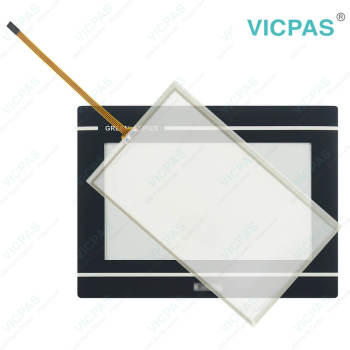
GT070E Touch Digitizer Glass Front Overlay Replacement


- group name
- Other Weinview Series
- Min Order
- 1 piece
- brand name
- VICPAS
- model
- GT070E
- Nearest port for product export
- Guangzhou, Hongknog, Shenzhen, Taiwan
- Delivery clauses under the trade mode
- FOB, CFR, CIF, EXW, FAS, CIP, FCA, CPT, DEQ, DDP, DDU, Express Delivery, DAF, DES
- Acceptable payment methods
- T/T, L/C, D/P D/A, MoneyGram, Credit Card, PayPal, Westem Union, Cash, Escrow
- update time
- Tue, 27 Oct 2026 09:01:36 GMT
Paramtents
Warranty 365 Days
Shipping 3-5 workdays
Brand Vicpas
Product Line Green loT Series
Supply Parts Front Overlay Touch Panel
Size 7''
Touch Type Resistive
Packging & Delivery
-
Min Order1 piece
Briefing
Detailed
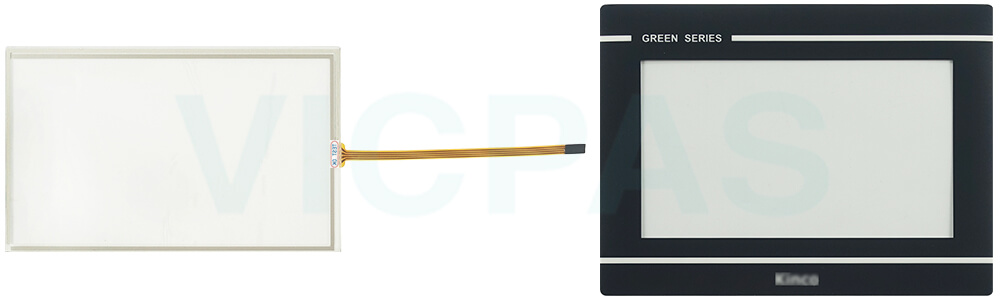
Weinview Green loT Series GT070E HMI Touch Glass Front Overlay Repair
Order each part separately is available
Safety Instructions
1. For plug-in equipment, the power outlet socket must be located near the equipment and must be easily accessible
2. Keep Weintek Weinview GT070E Touch Digitizer Glass Protective Film away from humidity.
3. Put GT070E Front Overlay Touch Screen Tablet on a reliable surface during installation. Dropping it or letting it fall may cause damage.
4. Make sure the voltage of the power source is correct before connecting the equipment to the power outlet.
5. Never open the whole equipment. For safety reasons, the equipment should be opened only by qualified service personnel.
6. Position the power cord so that people cannot step on it. Do not place anything over the power cord.
7. Never pour any liquid into Weinview HMI Green loT Series GT070E Protective Film Touch Screen Monitor. This may cause fire or electrical shock.
8. Read these safety instructions carefully in order to protect GT070E Touch Membrane Front Overlay.
Specifications:
The table below describes the parameters of the Weinview Green loT Series GT070E Touchscreen Protective Film.
| Touch Type: | Resistive |
| Front Panel: | IP65 |
| Brand: | Vicpas |
| Relative Humidity: | 10% ~ 90% |
| Product Line: | Green loT Series |
| Cooling Method: | Natural Air Cooling |
| Light Transmission: | Above 80% |
| Resolution: | 800 x 480 Pixels |
| Storage Temperature: | -20° ~ 60°C |
| Operating Temperature: | 0° ~ 50°C |
Related Weinview HMI No. :
| Weinview HMI | Description | Inventory status |
| FPM-180T | Weinview FPM Series Touch Screen Glass Front Overlay Replacement | In Stock |
| G070 | Green Standard Protective Film Touch Screen TabletRepair | Available Now |
| G070E | Green Standard Protective Film Touch Screen TabletRepair | In Stock |
| G070E-CAN | Green Standard Protective Film Touch Screen TabletRepair | Available Now |
| GH070 | Green Enhanced HMI Touch Glass Front Overlay Replacement | In Stock |
| GH070E | Green Enhanced Protective Film Touch Membrane Replacement | Available Now |
| GH070E-N | Green Enhanced Touchscreen Front Overlay Replacement | In Stock |
| GL070 | GREEN Series Protective Film Touch Screen Panel Repair | Available Now |
| GL070E | GREEN Series Protective Film Touch Screen Panel Repair | In Stock |
| GT070E | Green loT Series Front Overlay Touch Screen Monitor Replacement | Available Now |
| GT070E2 | Green loT Series Touch Screen Display Protective Film Repair | In Stock |
| Weinview HMI | Description | Inventory status |
Weinview HMI Manuals PDF Download:
FAQ:
Question: What is the durability(touches) of Weinview GT070E Touch Screen Glass?
Answer: The life of GT070E Touch Panel is 1 million activation minimum.
Question: How do I calibrate the touch screen on the Green loT Series HMI?
Answer: To calibrate the touch screen, go to the calibration settings in the HMI menu. Follow the on-screen instructions to touch specific calibration points accurately. This process ensures accurate touch input across the screen.
Question: How can I create and modify screens on the Green loT Series HMI?
Answer: Green loT Series HMIs usually come with dedicated software for screen development. Install the software on your computer, and then use it to design and customize screens with elements like buttons, images, text, and data display. The software often offers intuitive drag-and-drop interfaces for easy screen creation and modification.
Common misspellings:
GT0070E
GT70E
GTE70E
GT071E
GT007E