
- Home
- About us
- Products
- for Siemens
- Agricultural Terminal
- for A-B-B
- Advantech
- Allen Bradley
- AMTouch
- B&R Power Panel
- BECKHOFF HMI operator Repair
- Beijer HMI
- Bosch Rexroth
- Danielson Touch Screen Replacement
- Delem
- Delta
- DMC
- EATON Micro Panel
- ELO Touch Screen Panel
- ESA HMI
- Exor UniOP
- EZ Automation
- Fagor
- Fuji Hakko
- GE Fanuc
- GUNZE Touch Panel
- IDEC
- Koyo
- KUKA SmartPAD
- Lenze
- Microtouch 3M Versatouch touch screen
- Mitsubishi
- Omron
- Panasonic
- Parker
- Proface
- Red Lion
- Robotic Controller
- Schneider
- Sigmatek HMI
- Ventilator Parts
- Weinview
- Other Terminal Brand
- HMI Touch Screen Panel
- Touch Panel Screen Suppliers
- Touch Screen Panel supplier
- Auxiliary Accessories
- LCD Display
- test11
- Faqs
- News
- Certificate
- Contact us
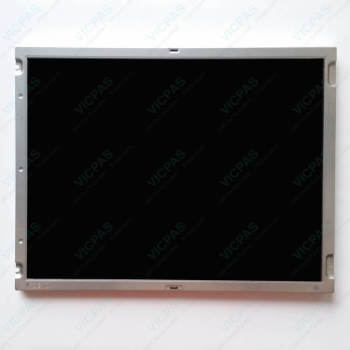
CP7812-0000-0010 LCD Panel HMI Touch Glass Operator Keyboard Replacement
- group name
- CP78XX CP79XX
- Min Order
- 1 piece
- brand name
- VICPAS
- model
- CP7812-0000-0010
- Nearest port for product export
- Guangzhou, Hongknog, Shenzhen, Taiwan
- Delivery clauses under the trade mode
- FOB, CFR, CIF, EXW, FAS, CIP, FCA, CPT, DEQ, DDP, DDU, Express Delivery, DAF, DES
- Acceptable payment methods
- T/T, L/C, D/P D/A, MoneyGram, Credit Card, PayPal, Westem Union, Cash, Escrow
- update time
- Mon, 26 Oct 2026 22:24:11 GMT
Paramtents
Product Line CP78XX CP79XX
LCD Type TFT
Shipping Time 3-5 Days
Supply Parts Switch Membrane Touch Screen Glass LCD Panel
Environment Free From Corrosive Gases
Size 15''
Packging & Delivery
-
Min Order1 piece
Briefing
Detailed
Beckhoff CP7812-0000-0010 LCD Screen Touch Screen Panel Terminal Keypad Replacement

The CP78XX Control Panel is designed for industrial applications in machine and plant engineering. An aluminum housing contains a TFT display, an optional Beckhoff Touch Panel CP7812-0000-0010 LCD Screen Operator Keyboard HMI Touch Glass. The panel can be installed using the four mounting holes on the backplane or the optional mounting arm system adapter.
VICPAS offers compatible replacement parts for the CP78XX Series, including high-quality Beckhoff HMI Keyboard CP7812-0000-0010 Touch Screen Glass LCD Display Membrane Keypad, providing reliable solutions for maintenance and component upgrades. We also provide Beckhoff Touch Screen CP7812-0000-0010 Terminal Keypad Touch Screen Monitor LCD Panel worldwide shipping and a 1-year warranty to ensure secure and convenient purchasing for customers around the globe.
Specifications:
The table below describes the parameters of Beckhoff CP7812-0000-0010 Touch Panel LCD Display Membrane Keyboard.
| Warranty: | 365 Days |
| Relative Humidity: | 95% |
| Environment: | Free From Corrosive Gases |
| Cooling Method: | Natural Air Cooling |
| Brand: | Vicpas |
| Operating Temperature: | 0 °C ... +55 °C |
| Size: | 15'' |
| Storage Temperature: | -25 °C ... +65 °C |
| LCD Type: | TFT |
| Product Line: | CP78XX CP79XX |
Related Beckhoff Part No. :
| Beckhoff HMI | Description | Inventory status |
| CP7802-1067-0010 | Beckhoff CP78XX Touch Screen Tablet Replacement | In Stock |
| CP7802-1327-0010 | Beckhoff CP78XX LCD Display Touch Screen Film Repair | Available Now |
| CP7803-0000-0011 | Beckhoff CP78XX Touch Screen Monitor Replacement | In Stock |
| CP7803-0001-0011 | Beckhoff CP78XX Touch Digitizer Glass Repair | Available Now |
| CP7803-0020-0011 |
Beckhoff CP78XX Touch Membrane Replacement |
In Stock |
| CP7803-0021-0011 | Beckhoff CP78XX Touch Screen Display Repair | Available Now |
| CP7803-1040-0011 | Beckhoff CP78XX HMI Touch Glass Replacement | In Stock |
| CP7809-0000-0000 | Beckhoff CP78XX Touch Screen Panel Repair | Available Now |
| CP7809-0001-0000 | Beckhoff CP78XX Touch Screen Glass Replacement | In Stock |
| CP7811-0000-0010 | Beckhoff CP78XX Membrane Keyboard Touch Screen Film Repair | Available Now |
| CP7811-0001-0010 | Beckhoff CP78XX Touch Screen Monitor Terminal Keypad Replacement | In Stock |
| CP7812-0000-0010 | Beckhoff CP78XX Operator Panel Keypad HMI Touch Glass Repair | Available Now |
| CP7821-0000-0010 | Beckhoff CP78XX Touch Screen Panel Membrane Switch Replacement | In Stock |
| CP7821-0001-0010 | Beckhoff CP78XX Membrane Keypad Touch Screen Display Repair | Available Now |
| CP7909-0000-0000 | Beckhoff CP79XX Touch Digitizer Glass Replacement | In Stock |
| CP7909-0001-0000 | Beckhoff CP79XX Touch Screen Panel Repair | Available Now |
| Beckhoff HMI | Description | Inventory status |
Beckhoff CP78XX CP79XX Manuals PDF Download:
FAQ:
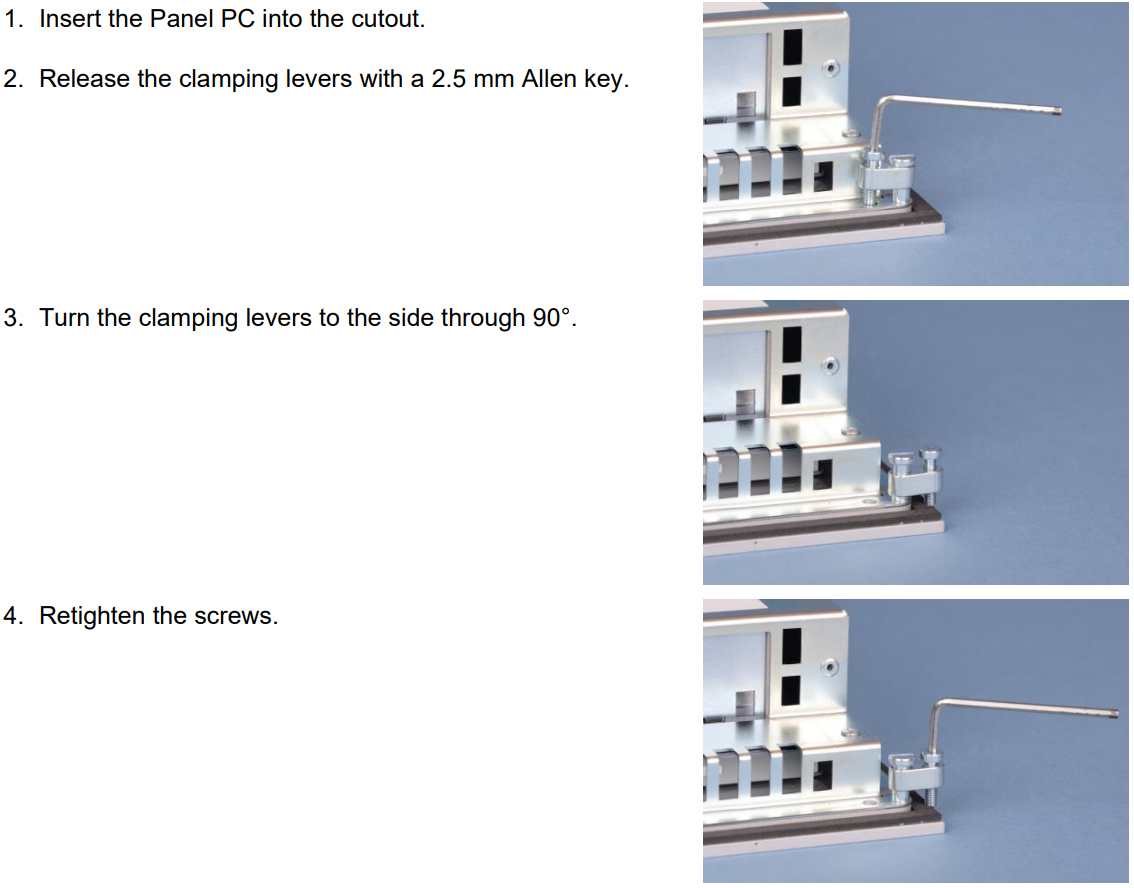
Question: How to mount the Panel PC of CP7812-0000-0010?
Answer:
Question: What should I pay attention to when installing CP7812-0000-0010 HMI Touch Glass Keypad Membrane LCD Display?
Answer:
• Position the Panel PC in such a way that reflections on the screen are avoided as far as possible.
• Use the position of the screen as a guide for the correct installation height; it should be optimally visible for the user at all times.
• The Panel PC should not be exposed to direct sunlight.
• When the unit is in its mounting position, the ventilation openings must not be obstructed.
• Extreme environmental conditions should be avoided as far as possible. Protect the Panel PC from dust, moisture and heat.
• The ventilation slots of the Panel PC must not be covered.
Common misspellings:
CP7812-000-0010CP7821-0000-0010
CP7812-0000-0011
CP7812-00000-0010
CP78121-0000-0010