
- Home
- About us
- Products
- for Siemens
- Agricultural Terminal
- for A-B-B
- Advantech
- Allen Bradley
- AMTouch
- B&R Power Panel
- BECKHOFF HMI operator Repair
- Beijer HMI
- Bosch Rexroth
- Danielson Touch Screen Replacement
- Delem
- Delta
- DMC
- EATON Micro Panel
- ELO Touch Screen Panel
- ESA HMI
- Exor UniOP
- EZ Automation
- Fagor
- Fuji Hakko
- GE Fanuc
- GUNZE Touch Panel
- IDEC
- Koyo
- KUKA SmartPAD
- Lenze
- Microtouch 3M Versatouch touch screen
- Mitsubishi
- Omron
- Panasonic
- Parker
- Proface
- Red Lion
- Robotic Controller
- Schneider
- Sigmatek HMI
- Ventilator Parts
- Weinview
- Other Terminal Brand
- HMI Touch Screen Panel
- Touch Panel Screen Suppliers
- Touch Screen Panel supplier
- Auxiliary Accessories
- LCD Display
- test11
- Faqs
- News
- Certificate
- Contact us
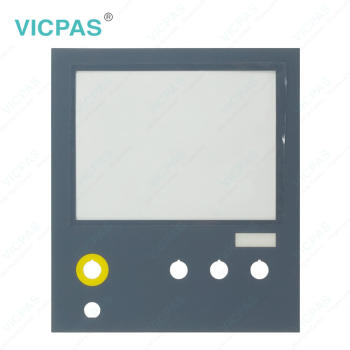
CP7901-1401-0010 Front Overlay Touch Screen Film Repair


- group name
- CP78XX CP79XX
- Min Order
- 1 piece
- brand name
- VICPAS
- model
- CP7901-1401-0010
- Nearest port for product export
- Guangzhou, Hongknog, Shenzhen, Taiwan
- Delivery clauses under the trade mode
- FOB, CFR, CIF, EXW, FAS, CIP, FCA, CPT, DEQ, DDP, DDU, Express Delivery, DAF, DES
- Acceptable payment methods
- T/T, L/C, D/P D/A, MoneyGram, Credit Card, PayPal, Westem Union, Cash, Escrow
- update time
- Wed, 30 Sep 2026 04:11:12 GMT
Paramtents
Product Line CP78XX CP79XX
LCD Type TFT
Shipping Time 3-5 Days
Supply Parts Touch Screen Monitor Protective Film
Environment Free From Corrosive Gases
Size 12''
Packging & Delivery
-
Min Order1 piece
Briefing
Detailed
Beckhoff CP7901-1401-0010 Protective Film Touch Screen Display Replacement

Proceed as follows to attach Beckhoff HMI CP7901-1401-0010 Protective Film to the touch screen:
1. Ensure that the environment is as dust-free as possible.
2. Thoroughly clean the surface of CP7901-1401-0010 Touch Panel to be fitted with the film and remove all grease residues.
3. Detach the film from the backing at the short edge and place it on the surface.
4. Gradually remove the film from the backing. At the same time, use a doctor blade or other object with a soft rubber or felt edge to apply the film.
5. Brush away air bubbles towards the edge with a doctor blade or other object with a soft rubber or felt edge.
Beckhoff Touch Panel CP7901-1401-0010 Front Overlay is now fitted. You can use the Dimming, Screensaver and Cleaning mode functions with the Display Control Tool.
Proceed as follows to unpack Beckhoff Touch Screen CP7901-1401-0010 Touch Screen Tablet Protective Film:
1. Check the packaging for transport damage.
2. Remove packaging.
3. Keep the packaging for possible future transport.
4. Check your delivery for completeness by comparing it with your order.
5. Check the contents for visible shipping damage.
6. In case of discrepancies between the package contents and the order, or in case of transport damage, please inform Vicpas.
Specifications:
The table below describes the parameters of Beckhoff CP7901-1401-0010 Touch Screen Display Front Overlay.
| Brand: | Vicpas |
| Size: | 12'' |
| Product Line: | CP78XX CP79XX |
| Cooling Method: | Natural Air Cooling |
| Operating Temperature: | 0 °C ... +55 °C |
| Environment: | Free From Corrosive Gases |
| Warranty: | 365 Days |
| Storage Temperature: | -25 °C ... +65 °C |
| Relative Humidity: | 95% |
| LCD Type: | TFT |
Related Beckhoff Part No. :
| Beckhoff HMI | Description | Inventory status |
| CP7901-1400-0000 | Beckhoff CP79XX Front Overlay Touch Screen Film Replacement | In Stock |
| CP7901-1400-0010 | Beckhoff CP79XX HMI Touch Glass Repair | Available Now |
| CP7901-1401-0000 | Beckhoff CP79XX Touch Screen Monitor Replacement | In Stock |
| CP7901-1401-0010 | Beckhoff CP79XX Touch Digitizer Glass Repair | Available Now |
| CP7902-0000-0000 | Beckhoff CP79XX Touch Screen Display Replacement |
In Stock |
| CP7902-0000-0010 | Beckhoff CP79XX Touch Screen Tablet Repair | Available Now |
| CP7902-0001-0000 | Beckhoff CP79XX Touch Membrane Replacement | In Stock |
| CP7902-0001-0010 | Beckhoff CP79XX Touch Screen Panel Repair | Available Now |
| CP7902-0020-0000 | Beckhoff CP79XX Touch Screen Glass Replacement | In Stock |
| CP7902-0020-0010 | Beckhoff CP79XX Touch Screen Film Repair | Available Now |
| CP7902-0021-0000 | Beckhoff CP79XX Touch Screen Monitor Replacement | In Stock |
| CP7902-0021-0010 | Beckhoff CP79XX HMI Touch Glass Repair | Available Now |
| CP7902-1071-0000 | Beckhoff CP79XX Touch Screen Panel Protective Film Replacement | In Stock |
| CP7902-1204-0000 | Beckhoff CP79XX Touch Screen Display Repair | Available Now |
| CP7902-1400-0000 | Beckhoff CP79XX Touch Digitizer Glass Replacement | In Stock |
| Beckhoff HMI | Description | Inventory status |
Beckhoff CP78XX CP79XX Manuals PDF Download:
FAQ:
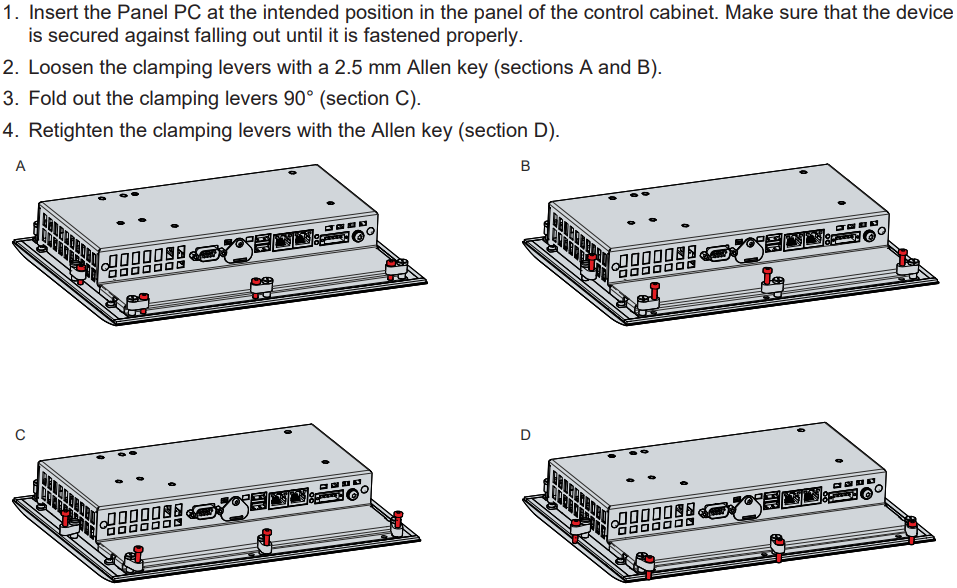
Question: How can I install and secure the Panel PC in the control cabinet?
Answer:
Question: How can I protect CP7901-1401-0010 Front Overlay Touch Panel?
Answer:
1. Use the touchscreen only with bare hands or while wearing appropriate gloves.
2. When wearing gloves, ensure they are free of hard particles such as metal shavings, glass splinters, or similar debris.
3. You can purchase a matching-size protective film from VICPAS to safeguard your touchscreen against dirt and scratches.
Common misspellings:
CP7901-1400-0010CP7901-1401-0011
CP7910-1401-0010
CP7901-4101-0010
CP7901-1401-0110