
- Home
- About us
- Products
- for Siemens
- Agricultural Terminal
- for A-B-B
- Advantech
- Allen Bradley
- AMTouch
- B&R Power Panel
- BECKHOFF HMI operator Repair
- Beijer HMI
- Bosch Rexroth
- Danielson Touch Screen Replacement
- Delem
- Delta
- DMC
- EATON Micro Panel
- ELO Touch Screen Panel
- ESA HMI
- Exor UniOP
- EZ Automation
- Fagor
- Fuji Hakko
- GE Fanuc
- GUNZE Touch Panel
- IDEC
- Koyo
- KUKA SmartPAD
- Lenze
- Microtouch 3M Versatouch touch screen
- Mitsubishi
- Omron
- Panasonic
- Parker
- Proface
- Red Lion
- Robotic Controller
- Schneider
- Sigmatek HMI
- Ventilator Parts
- Weinview
- Other Terminal Brand
- HMI Touch Screen Panel
- Touch Panel Screen Suppliers
- Touch Screen Panel supplier
- Auxiliary Accessories
- LCD Display
- test11
- Faqs
- News
- Certificate
- Contact us
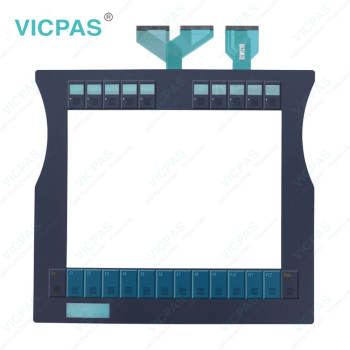
CP7911-0000-0010 CP7911-0001-0010 CP7921-0000-0010 CP7921-0001-0010 Operator Keyboard Touchglass


- group name
- CP78XX CP79XX
- Min Order
- 1 piece
- brand name
- VICPAS
- model
- CP7911-0000-0010 CP7911-0001-0010 CP7921-0000-0010 CP7921-0001-0010
- Nearest port for product export
- Guangzhou, Hongknog, Shenzhen, Taiwan
- Delivery clauses under the trade mode
- FOB, CFR, CIF, EXW, FAS, CIP, FCA, CPT, DEQ, DDP, DDU, Express Delivery, DAF, DES
- Acceptable payment methods
- T/T, L/C, D/P D/A, MoneyGram, Credit Card, PayPal, Westem Union, Cash, Escrow
- update time
- Tue, 29 Sep 2026 08:53:29 GMT
Paramtents
Product Line CP78XX CP79XX
Size 12''
LCD Type TFT
Shipping Time 3-5 Days
Supply Parts Terminal Keypad Touch Screen Film
Light Transmission Above 75%
Packging & Delivery
-
Min Order1 piece
Briefing
Detailed
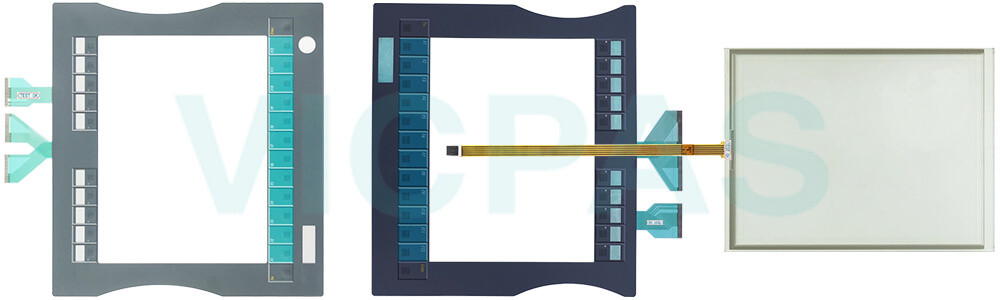
Beckhoff CP7911-0000-0010 CP7911-0001-0010 CP7921-0000-0010 CP7921-0001-0010 Operator Panel Keypad Touch Digitizer Glass Repair
Order each part separately is available
Transport
Despite the robust design of the unit, Beckhoff HMI CP7911-0000-0010 CP7911-0001-0010 CP7921-0000-0010 CP7921-0001-0010 Terminal Keypad Touch Membrane is sensitive to strong vibrations and impacts. During transport, your Industrial PC should therefore be protected from excessive mechanical stress. Therefore, please use the original packaging. CP7911-0000-0010 CP7911-0001-0010 CP7921-0000-0010 CP7921-0001-0010 Touch Screen Monitor Keypad Membrane Danger of damage to the unit! Warning If the device is transported in cold weather or is exposed to extreme variations in temperature, make sure that moisture (condensation) does not form on or inside the device. Prior to operation, Beckhoff Touch Panel CP7911-0000-0010 CP7911-0001-0010 CP7921-0000-0010 CP7921-0001-0010 Touch Digitizer Glass Operator Keyboard must be allowed to slowly adjust to room temperature. Should condensation occur, a delay time of approximately 12 hours must be allowed before the unit is switched on. Vicpas offers Beckhoff HMI Keyboard CP7911-0000-0010 CP7911-0001-0010 CP7921-0000-0010 CP7921-0001-0010 Membrane Switch Touch Screen Display global transportation, high quality, and a 1-year warranty. If there are any transportation issues, please contact Vicpas at any time.
Specifications:
The table below describes the parameters of Beckhoff CP7911-0000-0010 CP7911-0001-0010 CP7921-0000-0010 CP7921-0001-0010 HMI Touch Glass Keypad Membrane.
| Storage Temperature: | -25 °C ... +65 °C |
| Operating Temperature: | 0 °C ... +55 °C |
| LCD Type: | TFT |
| Size: | 12'' |
| Environment: | Free From Corrosive Gases |
| Product Line: | CP78XX CP79XX |
| Brand: | Vicpas |
| Cooling Method: | Natural Air Cooling |
| Relative Humidity: | 95% |
| Warranty: | 365 Days |
Related Beckhoff Part No. :
| Beckhoff HMI | Description | Inventory status |
| CP7909-0000-0010 | Beckhoff CP79XX Touch Digitizer Glass Replacement | In Stock |
| CP7909-0001-0010 | Beckhoff CP79XX HMI Touch Glass Repair | Available Now |
| CP7911-0000-0000 | Beckhoff CP79XX Terminal Keypad Touch Screen Panel Replacement | In Stock |
| CP7911-0000-0010 | Beckhoff CP79XX Touch Digitizer Glass Membrane Keyboard Repair | Available Now |
| CP7911-0001-0000 | Beckhoff CP79XX Switch Membrane Touch Screen Display Replacement |
In Stock |
| CP7911-0001-0010 | Beckhoff CP79XX Touch Screen Tablet Operator Panel Keypad Repair | Available Now |
| CP7911-1012-0000 | Beckhoff CP79XX Touch Membrane Replacement | In Stock |
| CP7911-1022-0000 | Beckhoff CP79XX LCD Display Touch Screen Panel Operator Keyboard Repair | Available Now |
| CP7911-1024-0000 | Beckhoff CP79XX Keypad Membrane Touchscreen LCD Screen Replacement | In Stock |
| CP7921-0000-0000 | Beckhoff CP79XX Touch Screen Film Membrane Switch Repair | Available Now |
| CP7921-0000-0010 | Beckhoff CP79XX Keyboard Membrane Touch Screen Display Replacement | In Stock |
| CP7921-0001-0010 | Beckhoff CP79XX HMI Touch Glass Operator Panel Keypad Repair | Available Now |
| CP7932-1222-0000 | Beckhoff CP79XX Touch Screen Monitor Replacement | In Stock |
| Beckhoff HMI | Description | Inventory status |
Beckhoff CP78XX CP79XX Manuals PDF Download:
FAQ:
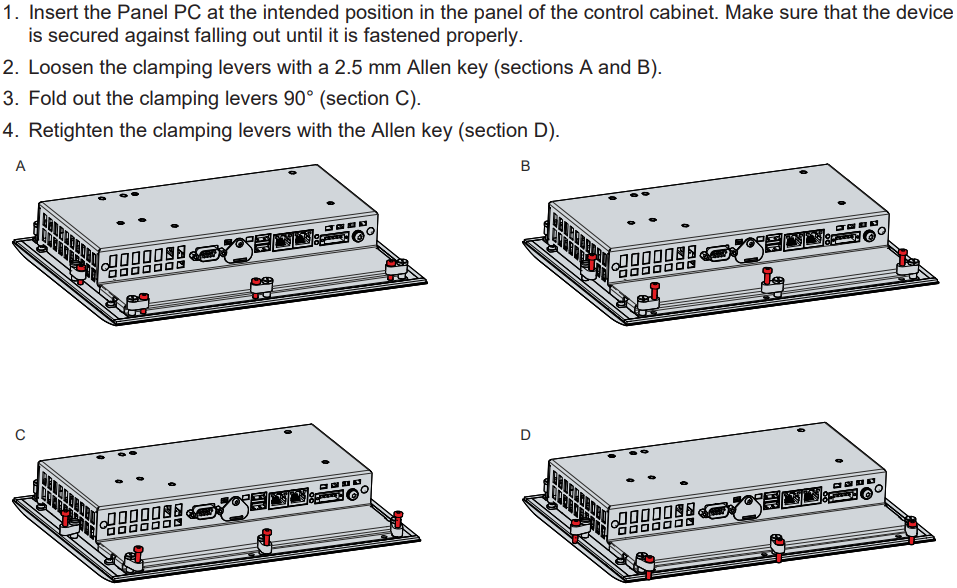
Question: How can I install and secure the Panel PC in the control cabinet?
Answer:
Question: What is the correct way to clean CP7911-0000-0010 CP7911-0001-0010 CP7921-0000-0010 CP7921-0001-0010 Control Panel?
Answer: Switch off the Industrial PC and all connected devices in order to prevent inadvertent operation of keys. The front of the Control Panel can be cleaned with a soft, damp cleaning cloth. Do not use any aggressive cleaning materials, thinners, scouring material or hard objects that could cause scratches.
Common misspellings:
CP79111-0000-0010CP7911-0001-0010
CP7911-0000-0011
CP791-0001-0010
CP7911-0101-0010
CP7911-0001-0001
CP7921-00000-0010
CP7921-0000-00010
CP7912-0000-0010
CP7921-0001-01010
CP7921-000-0010
CP79121-0001-0010